Handles & Blade templates
Handles are the identifiers that stitch SEK together. A handle is a stable, machine-readable name (for a section type, for a field) and the same handle is used at every layer: the config file, the registration list, the stored value, and the template. Nothing addresses anything by its human label; everything addresses by handle.
Section handles
Section titled “Section handles”A section type’s handle must match its file basename and the entry that
registers it:
blocks/hero.yamldeclareshandle: hero.- The file is
hero.yaml(basenamehero). - A post-type config lists
- heroundersections:to make it available.
All three must agree. If the handle, the filename, and the registration entry don’t match, the section won’t resolve.
templatePath: from config to template
Section titled “templatePath: from config to template”A section config points at its template with templatePath, written as a
dotted path:
handle: herotemplatePath: blocks.hero # → blocks/hero.phpblocks.hero resolves to blocks/hero.php in a plain-PHP theme like
starterkit-classic, or to the corresponding Blade view in a Sage theme. The
dotted form is the same view-path convention Laravel and Sage’s Blade use, so it
reads naturally in either kind of theme.
The render contract: $data and $sekAttr
Section titled “The render contract: $data and $sekAttr”Whatever the template language, SEK hands every section template exactly two variables:
$data: an associative array of the section’s saved values, keyed by each field’s handle. A field withhandle: headlineis read as$data['headline']. Always read defensively ($data['headline'] ?? ''): a value may be empty or not yet entered.$sekAttr: an attribute string that the section’s root element must echo. It emits adata-section-idmarker only inside the live-preview iframe and an empty string on the real front end. Echoing it is what makes a section targetable by live preview; because it is empty on live pages, the plugin never wraps or alters your markup and live output is byte-identical to raw template output.
starterkit-classic renders the contract with plain PHP short-echo tags:
<?phpif (! defined('ABSPATH')) { exit;}?><section class="hero"<?= $sekAttr ?>> <h1><?= sek_text($data['headline'] ?? '') ?></h1> <div><?= sek_text($data['intro'] ?? '') ?></div></section>Here is the same contract in Blade syntax, rendered in a Sage theme. Note
{!! $sekAttr !!} (unescaped, because it is an attribute string):
<section class="hero"{!! $sekAttr !!}> <h1>{!! sek_text($data['headline'] ?? '') !!}</h1> <div>{!! sek_text($data['intro'] ?? '') !!}</div></section>The contract renders identically wherever it runs: a plain-PHP theme like
starterkit-classic and a Sage/Blade theme produce byte-identical frontend
output from the same $data/$sekAttr pair. The difference between the two
theme kinds is the template code shown in the PHP/Blade tabs above, not the
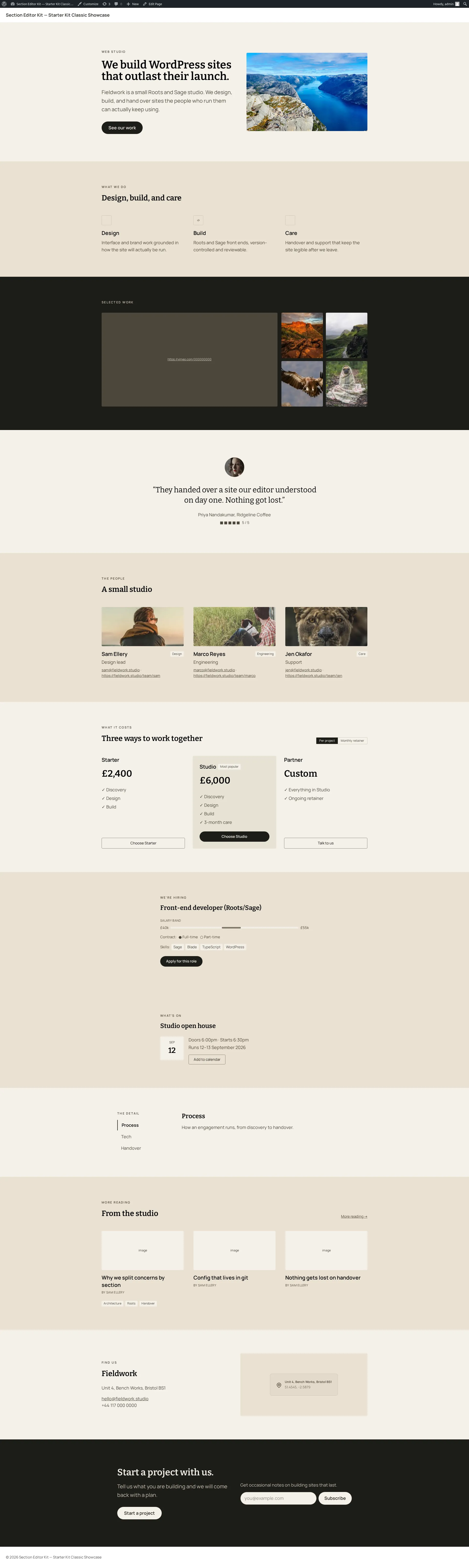
rendered result, so one rendered example is enough. Here’s the hero section
rendered live on the free, plain-PHP showcase; a Sage/Blade showcase run
through the same section would produce the same markup:
Output helpers
Section titled “Output helpers”Templates lean on small helpers so they read consistently and escape correctly. They come from two places:
-
sek_text(): text and WYSIWYG values. This is a plugin-provided global: it is available wherever the plugin runs, and themes deliberately do not redefine it. -
sek_image(): an image field’s stored{id, url, alt, thumbnail}object → an<img>(or its URL). -
icon(): an icon field’s symbol name → the inline SVG glyph.sek_image()andicon()are theme helpers: the starter kit defines them in itsinc/helpers.phpand they delegate to the plugin for the actual attachment/image resolution. A theme can adjust or add to these.
For plain attribute values, use WordPress’s own esc_html() / esc_attr(). The
invariant the plugin owns is the $data + $sekAttr pair (and the sek_text()
global); the image/icon rendering helpers are the theme’s to shape.
Why handles, not labels
Section titled “Why handles, not labels”Labels are for humans and can change freely: rename “Headline” to
“Title” in the config and nothing breaks, because the stored value and the
template both key on the headline handle, not the label. Handles are the
contract; labels are presentation. This is also why
reconciliation matches saved values to config
by handle: change a handle and the old value becomes a
lost value rather than silently attaching to the
wrong field.