Working with lost values
This page covers what you, as a content editor, actually see and can do when a page carries lost values. For why values get lost in the first place and how automatic recovery works underneath, see the concept page: Lost values / Inactive Fields.
The Inactive Fields panel
Section titled “The Inactive Fields panel”When a section holds one or more lost values, an Inactive Fields panel appears at the bottom of that section’s card, below its regular fields: collapsed by default, with a count badge and a reminder that re-adding a field with the same handle brings its value back automatically. Expand it and each lost value gets its own row: the handle it was saved under, and a truncated preview of the stored value (JSON for objects/arrays, the raw text for a plain string). Nothing in the panel is live on the front end: these are values with nowhere to attach under the section’s current fields, held safely rather than discarded.
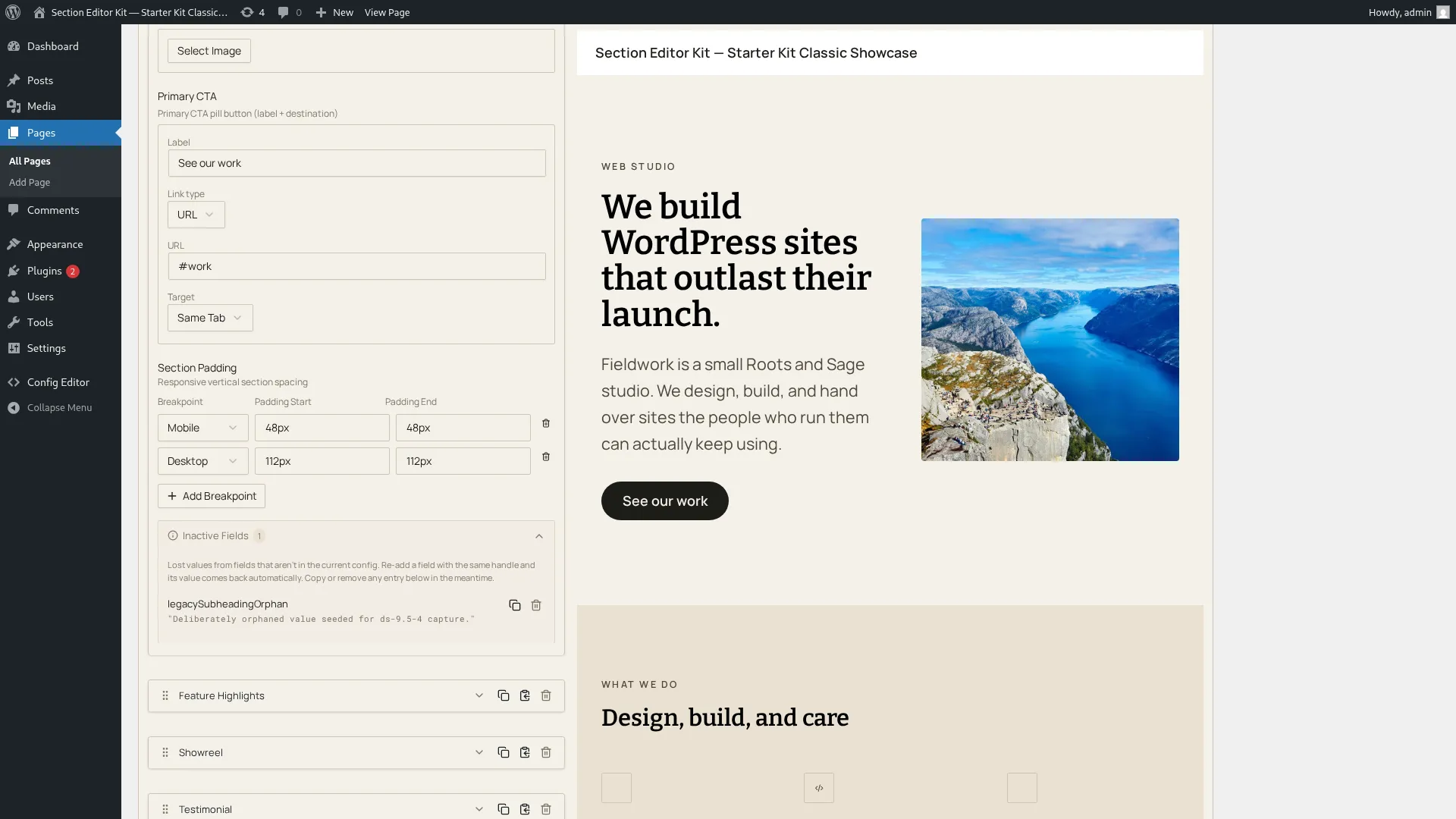
Each row has two actions:
- Copy: copies that value to your system clipboard (as plain text for a string, JSON for anything structured), so you can paste it somewhere else (a document, a new field, wherever you need the content) before deciding what to do with it.
- Delete: removes just that one inactive value, with an inline confirm step (the same check/cancel pattern used elsewhere). This is a normal edit like any other: it’s undoable, so Ctrl/Cmd+Z brings a deleted inactive value straight back if you change your mind. See History, source view & clipboard.
Recovery, from the editor’s side
Section titled “Recovery, from the editor’s side”Recovery itself is automatic and happens at the data layer: you don’t click anything to “restore” a value. What you need to know as an editor is when it happens: the editor reconciles stored values against the current config when it mounts, so if a field was removed from a section type and then re-added (with the same handle), the value reappears in that field the next time the editor loads the page, not instantly mid-session, because the section-type config the running editor is using doesn’t change underneath you while you’re actively editing. Refresh or reopen the page after the field comes back, and the Inactive Fields entry is gone, its value sitting back in the live field where it belongs.