Mass Migration
Per-section migration rules apply the
moment a page is reconciled: one page at a time, whenever it’s next opened.
Mass Migration Premium is the operator-facing alternative: preview and
apply a section’s (or a post type’s) migrations: rules across every
existing instance at once, without waiting for pages to be individually
re-opened and saved.
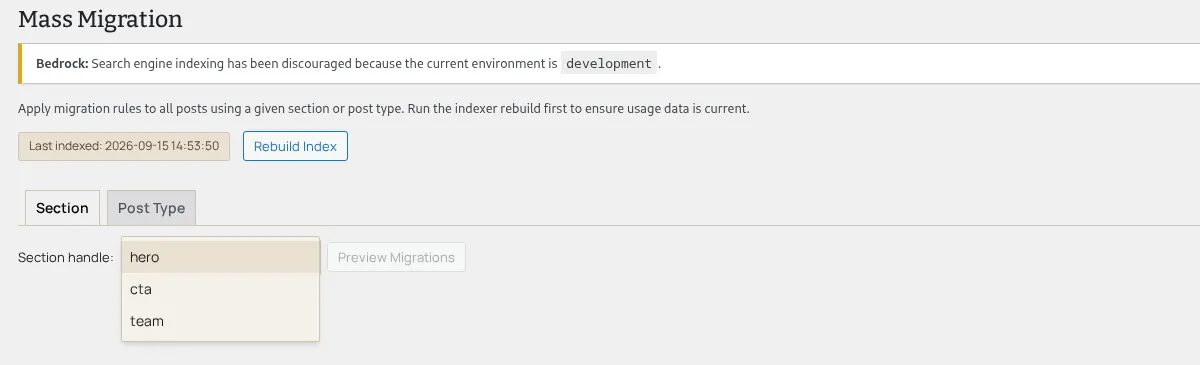
Here’s the Mass Migration admin screen: the migration preview/apply island, a premium-download feature:
Scope: section or post type
Section titled “Scope: section or post type”The Mass Migration admin page offers two scope tabs (Section and
Post Type) plus a handle selector for whichever scope is active (a
section handle, or a post-type handle). Choosing a scope and clicking
Preview Migrations fetches every pending change for that scope’s
declared migrations: rules.
Preview before you touch anything
Section titled “Preview before you touch anything”Preview is read-only: GET /sek/v1/migrations/preview (exactly one of a
section or content-type query param: the route rejects both present or
both absent) returns one row per (post, rule) pair currently affected,
with the rule’s proposed source path, current value, and whether it’s a
move or a delete. The pending-changes table renders Post, Rule,
Current Value, Shape, Actions, and Status columns: nothing
is written to any post until you act on a row.
Here’s the scope picker with a section handle selected, right after
Preview Migrations has fetched a real pending change: one row for a
post whose section still holds the pre-migration heading value, with its
proposed heading → title move, current value, and shape (a
premium-download feature).

Per-row actions
Section titled “Per-row actions”Each pending-change row offers:
- Accept: apply that row’s rule, as previewed, to that one post’s section instance.
- Delete Value: apply the same row’s
frompath as a delete rule instead of the previewed move, for when you’ve decided the value shouldn’t be kept at all. - Manually Edit: edit the proposed value as JSON before applying, for cases where the previewed migrated value needs a human correction (a reshaped compound value, for example) rather than a straight move.
- Preview: opens a dialog rendering the section template with the migration’s effect applied, so you can sanity-check the visual result before committing.
Every one of these actions posts to POST /sek/v1/migrations/apply with the
rule, the target post, and (where a page has more than one instance of the
same section) a section_path descent breadcrumb that targets exactly the
previewed instance rather than every matching instance on that post.
Applied/deleted/edited rows update their Status column in place.
Here’s a pending row with Manually Edit open: the inline text editor pre-filled with the previewed value, its Submit/Cancel controls, and the row’s Accept, Delete Value, and Preview actions all visible at once (a premium-download feature).

Apply All
Section titled “Apply All”Apply All posts to POST /sek/v1/migrations/apply-all with just the
scope, applying every currently-pending change for that scope in one
request and reporting a processed/failed count. Rules that can’t be
evaluated (an unresolvable destination, or a destination that turns out to
be an array-shaped field) surface in a failures banner rather than
silently failing or blocking the rest of the batch: the same two failure
reasons the migration runner itself
can produce.
Here’s the outcome right after clicking Apply All on a pending batch: the “Apply All complete. Processed: 1, Failed: 0.” banner above the Apply All control (a premium-download feature).

Rebuild Index
Section titled “Rebuild Index”A Rebuild Index button and a “last indexed” badge sit alongside the scope selector, backed by the same section-usage index the premium admin uses elsewhere to find which posts use a given section. Rebuilding brings the affected-posts list current before you preview a scope that may have grown since the index last ran.
Permissions
Section titled “Permissions”All three migration REST routes (preview, apply, apply-all) require the
WordPress manage_options capability. This is a narrower gate than global
sections’ edit_posts capability: migrations write directly to post meta
and bypass the normal save_post flow, so Mass Migration is an
administrator-only surface.
Where to go next
Section titled “Where to go next”- Per-section migration rules: the rule shapes and dotted-path scheme this page applies at scale.